refs 폴더에 내가 좋아하는 웹사이트 5개 화면을 넣어놨어. 이 5개의 느낌을 참고해서 가상의 에너지 드링크 브랜드 NITRO ZERO 홈페이지를 index.html 한 파일로 만들어줘. 어둡고 강한 톤에 3D 캔, 스크롤 연출, 맛 3종 소개, 구매 버튼까지 넣어줘.JSEED AI LAB · QUICK GUIDE
사이트 5개로 홈페이지부터 광고 영상까지, NITRO ZERO 프롬프트
좋아하는 사이트 화면 5장을 클로드에 넣어 가상 에너지 드링크 홈페이지를 만들고, 그 캔 사진 한 장으로 숏폼 광고·시네마틱·게임풍 광고까지 만들었어요. 영상에 나온 프롬프트를 그대로 담았어요.
① 완성된 홈페이지
프롬프트 한 번으로 나온 홈페이지예요. 3D 캔이 스크롤에 맞춰 돌고, 맛 3종 소개와 구매 화면까지 한 파일에 들어 있어요. 휴대폰으로 열어도 잘 보여요.
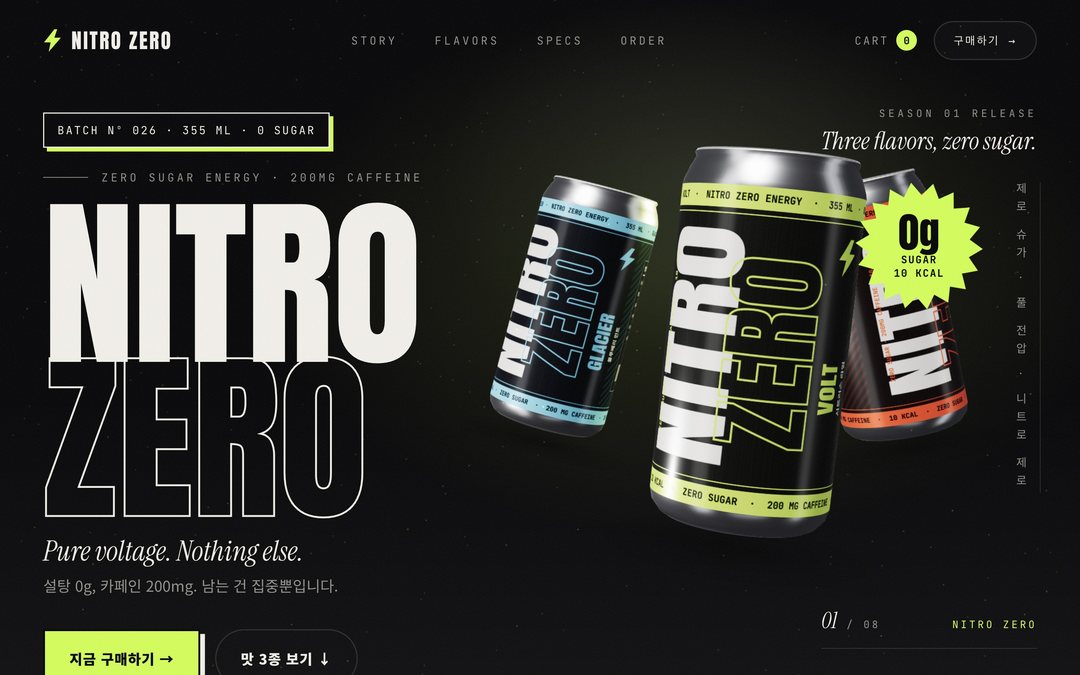
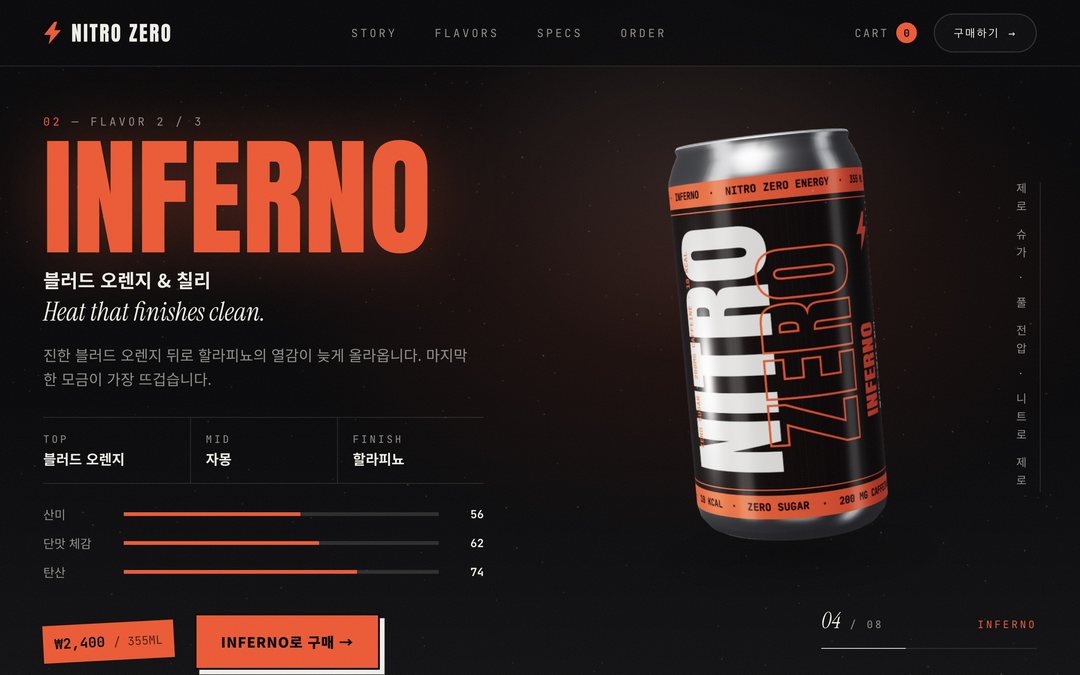
② 홈페이지 프롬프트
준비물
- 클로드 코드 (Claude Code)
- 좋아하는 웹사이트 화면 캡처 5장
- 컴퓨터에 새 폴더를 하나 만들고, 그 안에
refs폴더를 만들어요 - 마음에 드는 웹사이트 첫 화면을 캡처해서
refs폴더에 5장 넣어요 - 그 폴더에서 클로드 코드를 열고 아래 프롬프트를 붙여 넣어요
영상에서 넣은 사이트 5개예요. 어둡고 강한 느낌, 큰 글자, 제품을 크게 보여 주는 사이트들이에요.
홈페이지 만들기
브랜드 이름, 제품, 분위기만 바꾸면 카페, 향수, 운동화 홈페이지도 똑같이 만들 수 있어요.
다 만든 뒤에 이어서 말한 것
모바일 폭에서도 겹치는 곳 있는지 확인해줘브라우저 열고 확인해글자와 캔이 겹치거나 메뉴가 두 줄로 꺾이는 곳을 클로드가 직접 찾아서 고쳐요. 마지막에 브라우저로 한 번 더 보게 하면 실제 화면 기준으로 다시 고쳐요.
③ 클로드에 힉스필드 연결하기
광고 영상은 클로드에 힉스필드를 연결해서 만들었어요. 한 번만 연결해 두면 대화창에서 말로 영상을 만들 수 있어요.
- Higgsfield 계정: 힉스필드 연결하기
- Claude를 열고 설정으로 들어갑니다
- 커넥터 → 커스텀 커넥터 추가를 누릅니다
- 주소 칸에 아래 주소를 붙여 넣습니다

https://mcp.higgsfield.ai/mcp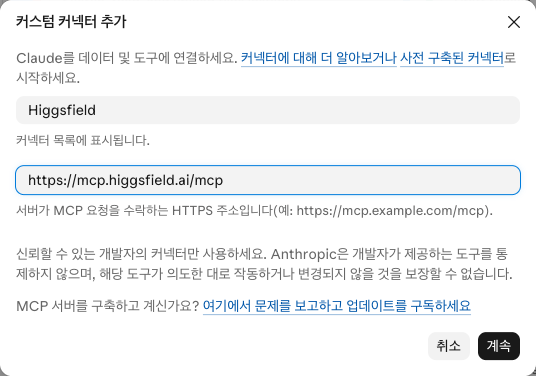
- 연결을 누르고 Higgsfield에 로그인합니다
- 새 대화를 열면 Claude가 Higgsfield를 쓸 수 있습니다
④ 제품 사진 한 장 준비하기
광고 영상 세 개 모두 이 사진 한 장을 참고 이미지로 넣었어요. 홈페이지 첫 화면에서 캔 부분만 캡처한 사진이에요. 참고 이미지가 있어야 영상마다 캔 모양과 글자가 똑같이 나와요.
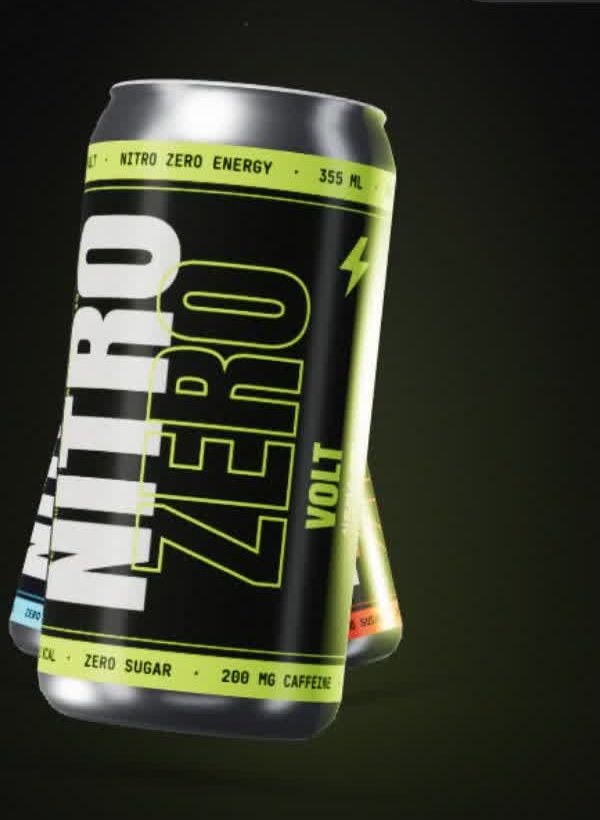
클로드에 사진을 올리고 "이 사진을 참고 이미지로 넣어서 아래 프롬프트로 힉스필드에서 영상 만들어 줘"라고 한 뒤 프롬프트를 붙여 넣으면 돼요. 내 제품으로 바꿀 때는 프롬프트 속 캔 설명(matte black can, lime-green band, bold 'NITRO ZERO' lettering)만 내 제품 설명으로 바꿔요.
⑤ 숏폼 광고 프롬프트
밤 옥상에서 캔을 따는 순간 라임색 빛이 터지고, 춤추다가 캔을 내려놓는 8초 광고예요. 효과음까지 같이 나와요.
- Seedance 2.5
- 9:16
- 8초
- 1080p
- 소리 생성 켜기
- 참고 이미지: 캔 사진
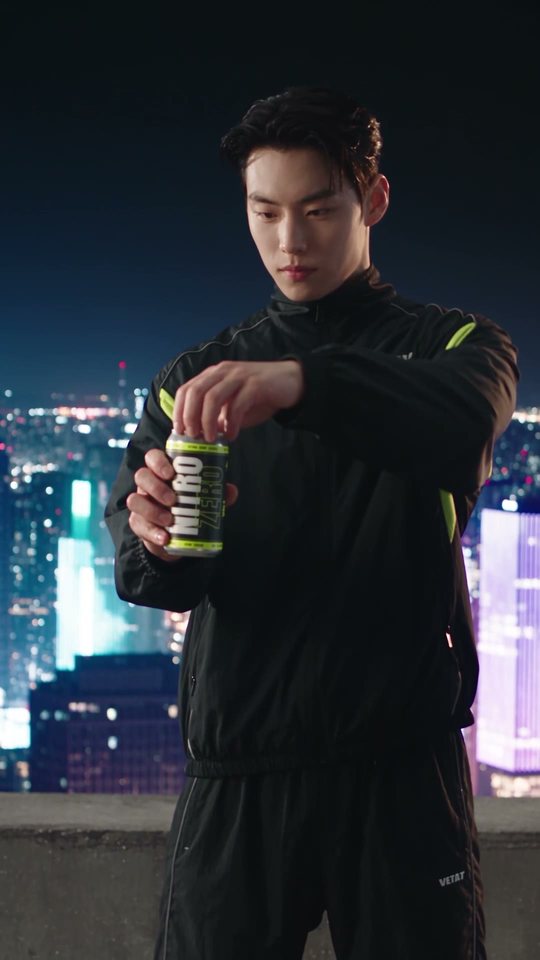
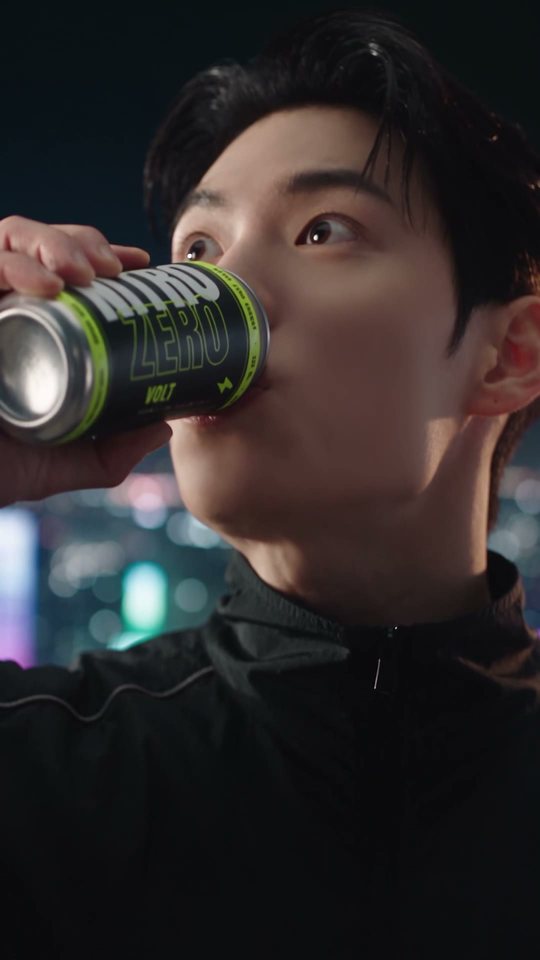
High-energy sports drink commercial, vertical, fast cuts. Night rooftop in a neon-lit city: a stylish fictional young Korean dancer in a black tracksuit cracks open an energy drink can, a shockwave of lime-green light bursts outward and the city lights surge. Quick cuts: close-up of the can opening with spray in slow motion, the dancer drinking, an explosive dance move with motion trails of lime light, then the can slammed down on a concrete ledge in a dramatic hero close-up with the skyline behind. The can is exactly the one in the reference image: matte black, lime-green band, bold 'NITRO ZERO' lettering, sharp and readable in every shot. Cinematic, glossy, big-budget commercial, dynamic handheld and whip pans. Punchy sound design with a bass-heavy beat, can crack, fizz, whooshes. The dancer is an original fictional character, not a likeness of any real person. No subtitles, no captions, no added text.같이 뽑은 다른 버전: 얼음과 번개
사람 없이 캔만 나오는 버전이에요. 얼음벽을 뚫고, 번개가 감기고, 물방울이 터지면서 캔이 착지해요.
Premium energy drink TV commercial, vertical, rapid dynamic multi-shot sequence with speed ramps. Shot 1: extreme macro of ice-cold condensation droplets racing down a matte black can. Shot 2: the can smashes through a wall of crushed ice in slow motion, shards flying toward the lens. Shot 3: electric lime-green lightning arcs wrap around the spinning can, sparks and smoke. Shot 4: a liquid splash crown explodes outward as the can lands on a wet black surface, camera whip-pans and pushes in to a dramatic low-angle hero shot with rim light and lens flares. The can is exactly the one in the reference image: matte black, lime-green band, bold 'NITRO ZERO' lettering, always sharp and readable. Big-budget beverage commercial look, high contrast, glossy, cinematic. Powerful sound design: deep bass drop, whooshes, ice cracks, electric zaps, energetic trap beat. No subtitles, no captions, no added text or logos other than the can label.⑥ 시네마틱 광고 프롬프트
새벽 서울 도로를 달리는 슈퍼카, 운전석의 남자, 마지막에 카메라 앞으로 캔을 내미는 영화 예고편 같은 8초 영상이에요. 장면을 초 단위로 나눠 적으면 순서대로 나와요.
- Seedance 2.5
- 9:16
- 8초
- 4K
- 참고 이미지: 캔 사진
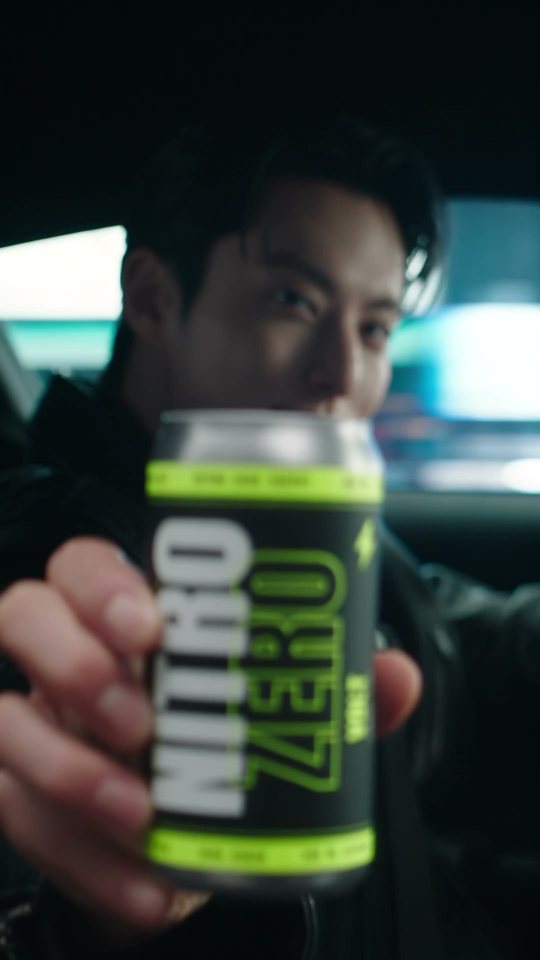
Cinematic movie-trailer sequence, vertical, three shots, all continuous driving, the driver never leaves the car. Shot 1 (0-2.5s): pre-dawn Seoul, wet empty street with neon signs and N Seoul Tower in the blue-hour skyline; a matte black supercar races toward the camera, low tracking shot, motion blur, spray from the tires, anamorphic flares. Shot 2 (2.5-4.5s): inside the moving car, close-up of the driver, a strikingly handsome fictional Korean man in his mid-twenties with the polished look of a K-pop idol turned film actor: sharp jawline, styled dark hair, black leather jacket, calm intense eyes lit by passing red and blue neon, one hand on the wheel. Shot 3 (4.5-8s): still seated in the driver's seat with the city lights streaking past the window, he looks into the camera and stretches his arm straight toward the lens holding an energy drink can, the can stops large and sharp in the foreground and holds there, his face softly out of focus behind it, a slight confident smile. The can is exactly the one in the reference image: matte black, lime-green band, bold 'NITRO ZERO' lettering, clearly readable. Photorealistic, 35mm film look, teal-and-black grade, shallow depth of field. He is an original fictional character, not a likeness of any real person. No subtitles, no captions, no text overlays, no extra logos.⑦ 게임풍 광고 프롬프트
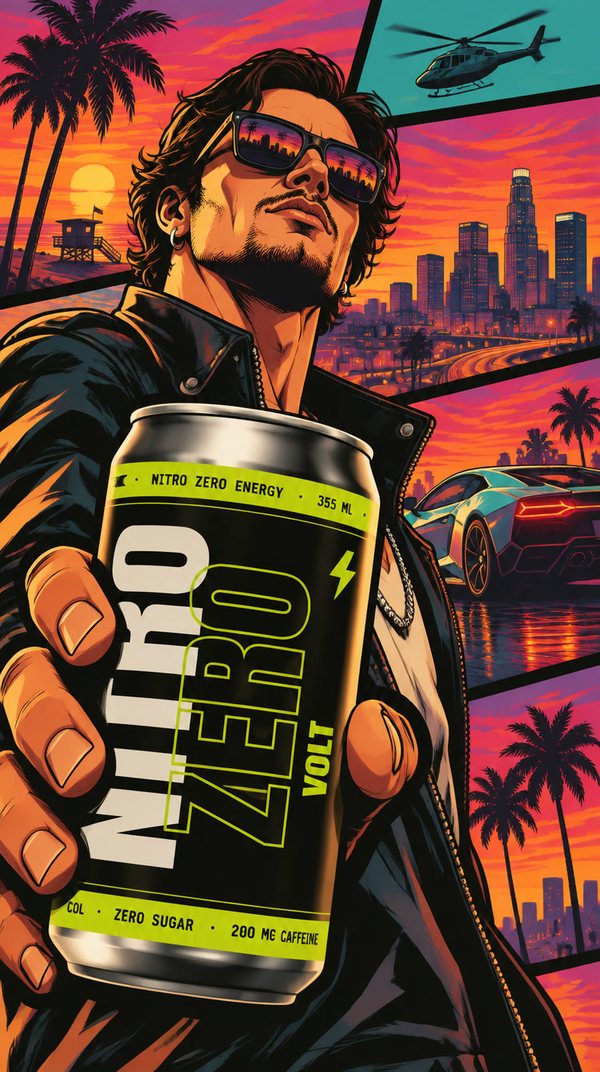
오픈월드 게임 화면 속 광고판에 캔이 나오는 영상이에요. 게임 포스터 이미지를 먼저 만들고, 그 포스터와 캔 사진을 같이 넣어 영상을 만들어요.
1단계: 게임 포스터 이미지
- GPT Image 2.6
- 9:16
- 넣는 이미지: 캔 사진
Turn this product photo into a vertical key-art poster in the style of an open-world crime video game loading screen: bold cel-shaded comic illustration with thick black outlines, saturated sunset palette of orange, magenta and teal, palm trees, a low sports car and a city skyline at dusk. A confident character in sunglasses and a leather jacket holds the same energy drink can toward the viewer. Keep the can exactly as in the photo: matte black can, lime-green band, bold 'NITRO ZERO' lettering, clearly readable. Collage panel composition typical of game cover art, the can large in the lower half. No game logos, no trademarks, no extra text besides the can label.2단계: 게임 플레이 영상
- Seedance 2.5
- 9:16
- 6초
- 1080p
- 참고 이미지 2장: 캔 사진, 1단계 포스터
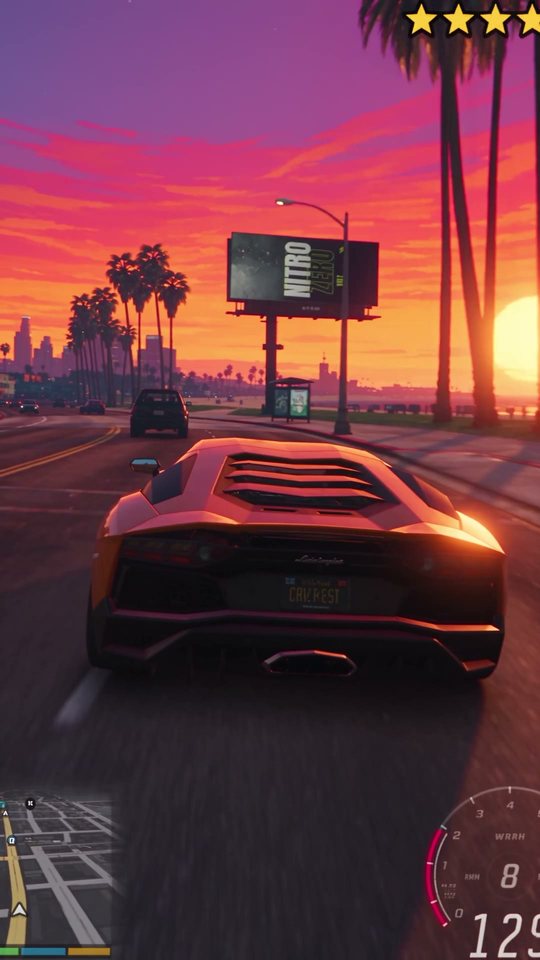
Vertical gameplay footage from a stylized open-world crime action video game, third-person camera behind a low orange sports car speeding down a palm-lined coastal boulevard at sunset, saturated orange and magenta sky, slightly stylized game graphics like a modern console title. Game HUD visible: a round minimap in the bottom-left corner, a small speed readout, a wanted-stars row in the top-right. The car weaves past traffic and passes huge roadside billboards and a bus-stop ad that show the energy drink can from the first reference image (matte black can, lime-green band, bold 'NITRO ZERO' lettering). In the last two seconds the camera swings to the front of the car and the driver, a character in sunglasses and a leather jacket matching the second reference illustration, raises the same can. It should feel like an in-game advertisement and real gameplay capture. No real game logos, no trademarks, no subtitles.처음부터 4K로 뽑으면 크레딧이 금방 떨어져요. 1080p로 먼저 보고, 마음에 드는 것만 고화질로 다시 만들어요.
⑧ 더 자세하고 쉽게 만들고 싶다면
내 제품으로 바꾸는 법, 장면 고치는 말, 크레딧 아끼는 순서까지 더 자세하고 쉽게 만들고 싶으시면 톡방으로 들어오세요.
MORE RESOURCES
이어서 보면 좋은 자료






FIRST STEP
처음이라면, 이 순서로 해보세요.
WEEKLY NEWSLETTER
위클리 뉴스레터,
이메일로 받아보세요.
매주 정리한 AI 트렌드와 실습 자료,
무료특강 일정 안내를 이메일로 보내드려요.
AI 최신 소식은 카카오톡 채널 (새 창)에서 받아요