“아무것도 믿지 마세요” 영상은 이렇게 만들어요
Genjutsu로 마이크를 대본 카드로, 삼각대를 아나운서로 바꾸는 프롬프트와 컷 편집법을 따라 해요.
이 순서로 따라 해보세요
기준 영상 촬영하기
카메라를 고정하고 손의 마이크와 옆 삼각대가 같이 보이도록 한 테이크를 찍어요. 사용할 화면 열기 ↗ (새 창)
바꿀 물건 지정하기
Genjutsu Objects swap에 영상과 참고 이미지를 넣고 교체 대상 하나와 유지할 요소를 적어요.
말하는 순간 바로 컷하기
원본 음성을 깔고 ‘마이크’ 또는 ‘삼각대’ 대사에서 컷을 넘겨요. 컷 양쪽에서 손과 입 모양이 이어지는지 확인해요.
제작 화면 · 단계별 실습 · 프롬프트
먼저 대본 카드가 마이크로 바뀌는 순간을 봐요
카메라를 고정해 방에서 한 번 촬영한 뒤, 같은 동작 위에 소품·옷·배경을 바꾼 버전을 만들어요. 소품의 정체를 말하는 단어에서 원래 화면으로 컷하면, 말은 이어지면서 손에 든 물건만 바뀐 것처럼 보여요.
1. 교체할 물건이 보이게 한 테이크로 찍어요
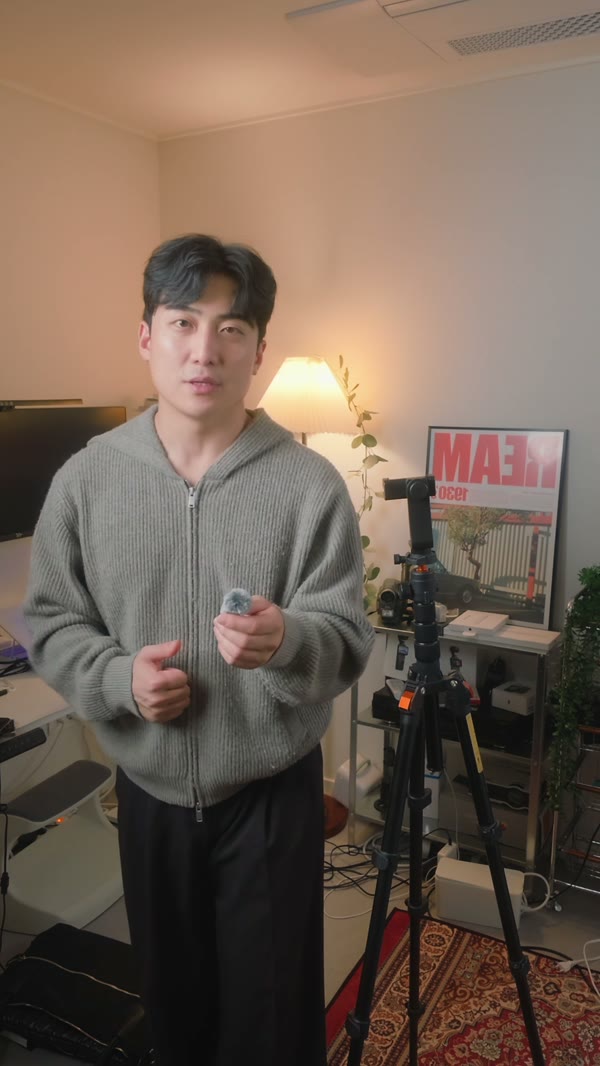
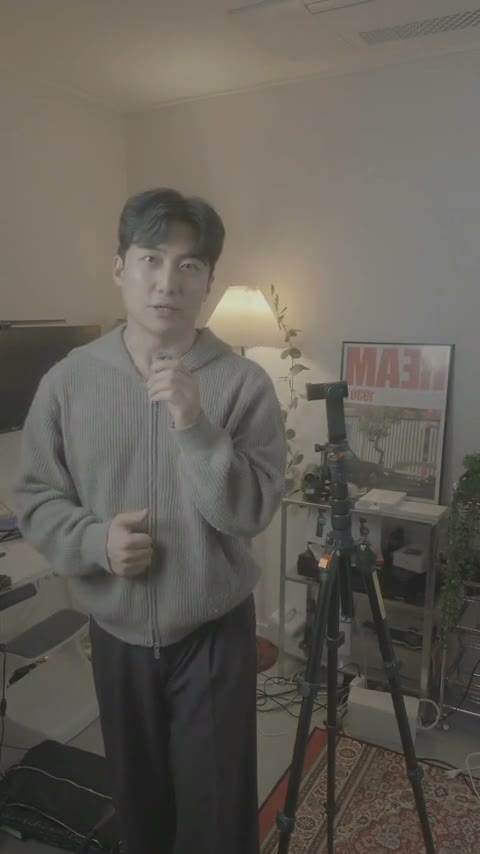
이 편은 회색 집업을 입고 손에 마이크를 든 채 방에서 촬영했어요. 화면 오른쪽에는 촬영용 카메라와 별개의 검은 삼각대를 세웠어요. 직접 찍을 때도 카메라 위치와 노출을 고정하고, 손에 든 물건과 옆 물건이 사람의 얼굴과 겹치지 않게 해요.
2. Genjutsu에서 교체 대상을 하나만 잡아요
힉스필드에서 Video → Create Video → Higgsfield Genjutsu → Objects swap을 열어요. 4~30초 원본 영상과 교체할 소품 또는 인물의 참고 이미지를 넣고 프롬프트를 켜세요.
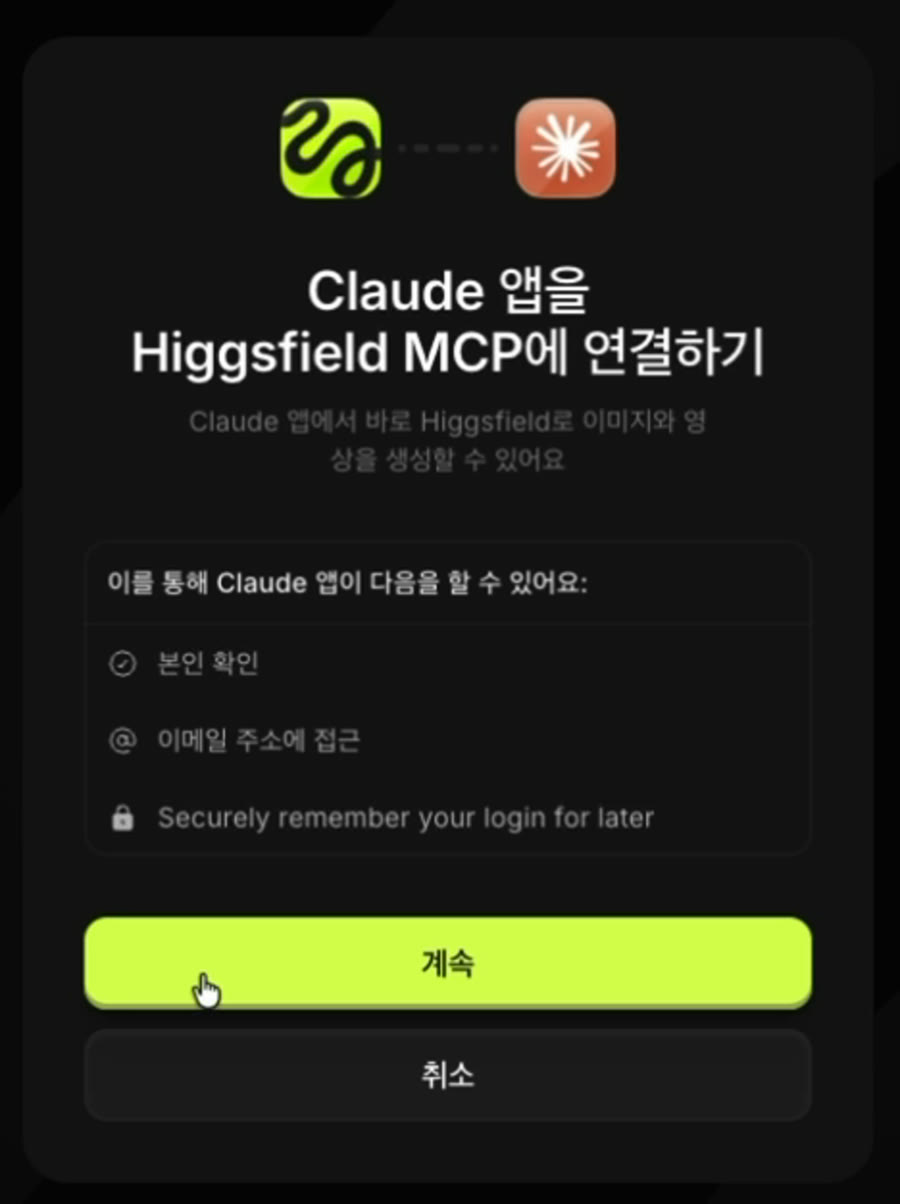
Claude에서 Higgsfield를 사용하려면 아래 연결 순서를 따라 하세요.
Claude에 Higgsfield 연결하는 화면 보기
- Claude 웹이나 데스크톱에서 설정의 커넥터를 열고 커스텀 커넥터를 추가해요. 이름은 Higgsfield로 입력해요.
- 아래 주소를 붙여 넣고 연결을 누르세요. 열리는 힉스필드 창에서 사용하려는 계정인지 확인하고 권한을 승인해요.
- Claude의 커넥터 목록에 Higgsfield가 표시되는지 확인해요. 새 대화를 열고 Fable 5.2가 모델 목록에 보이면 선택해요. 예제 파일을 넣을 때는 Higgsfield 업로드 창을 열어 달라고 요청하고, 파일 업로드 완료 메시지를 먼저 확인하세요.
https://mcp.higgsfield.ai/mcp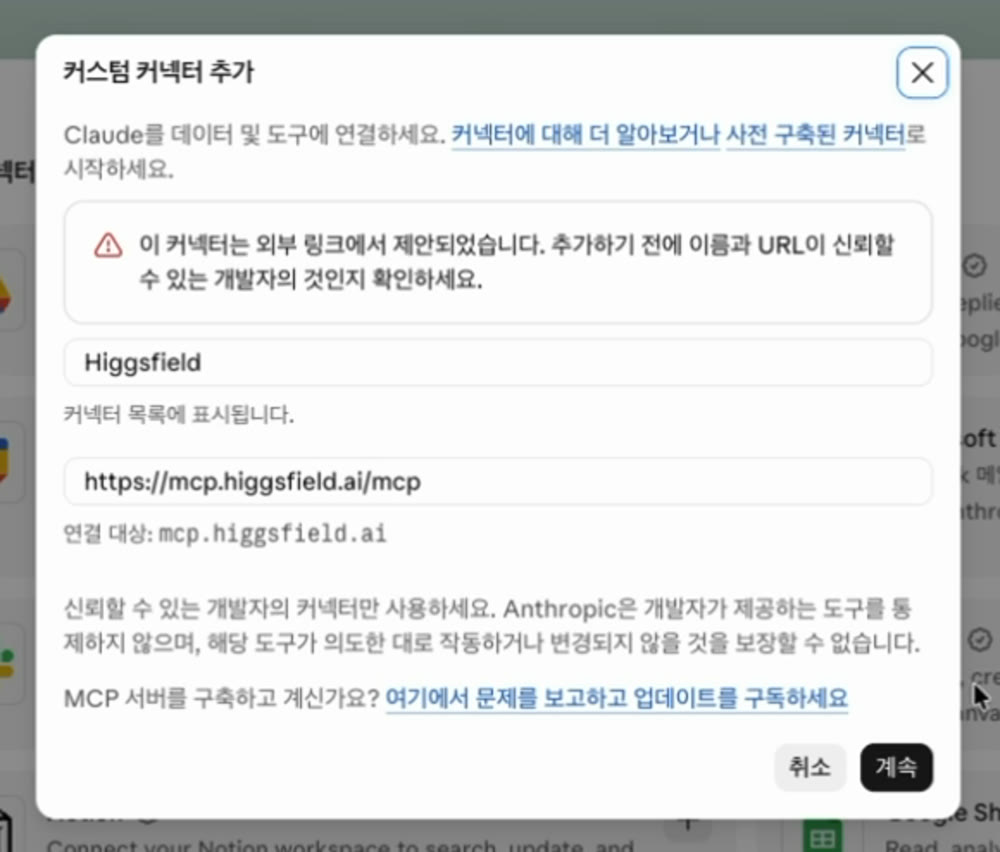
3. 소품과 인물을 바꾸는 프롬프트를 복사해요
마이크를 대본 카드로
원본 영상에 작은 흰색 대본 카드 참고 이미지를 넣어요. 카드 크기, 손가락이 앞을 가리는 부분, 손목 회전, 조명을 함께 적어야 카드가 손을 따라가요.
Perform one localized prop replacement throughout the source clip. Replace ONLY the small furry handheld microphone held near the man's lower chest with the compact matte-white A6 landscape presenter cue card in the image reference. Keep the card consistently 15 x 10.5 cm, its bottom edge naturally gripped by the same hand. Match the exact hand trajectory, wrist rotation, perspective, finger occlusion, contact shadows, and original motion blur frame by frame. Keep the card visible as a solid physical object from the first frame to the last. Preserve the original man's identity, face, hair, eyes, mouth shapes, speech timing, body proportions, gray zip sweater, black trousers, the separate gesturing hand, the room, tripod, poster, lamp, camera framing and timing. Retain the source lighting and color grade. Do not replace the floor tripod or other objects. Do not add people. No scene transition, morph, dissolving, particles, Matrix code, glow, graphics, subtitles or camera movement. This will later be hard-cut to the untouched source at the spoken word for microphone; do not animate the reveal inside this generated clip.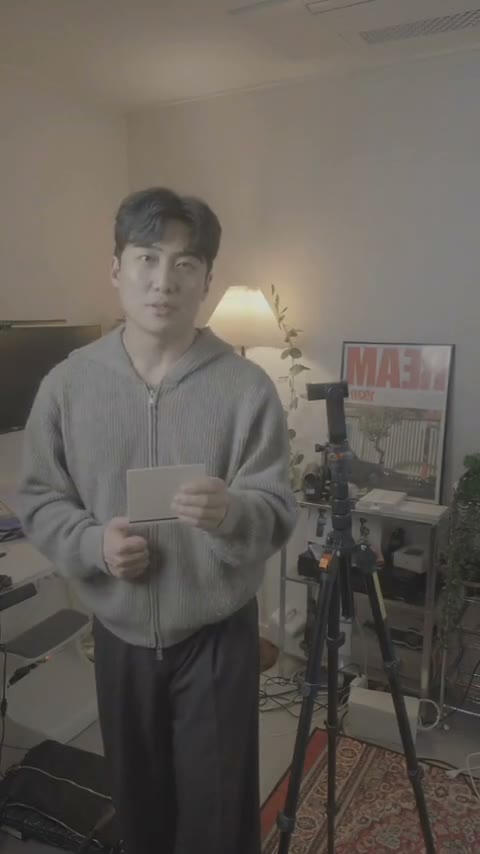
삼각대를 가상의 아나운서로
인물 참고 이미지를 넣을 때는 삼각대 발이 닿던 위치를 기준으로 사람의 키와 원근을 맞춰요. 발표자는 그대로 두고 옆 인물의 그림자, 조명, 시선만 조정해요.
Make one localized replacement for the entire source clip. Replace ONLY the separate tall black floor-standing camera tripod on the viewer's right of the speaking man with the fictional adult female presenter from the reference image. Preserve the reference woman's identity and outfit exactly: ivory fine rib-knit long-sleeve fitted cardigan with a wide gently squared scoop neckline and small gold-tone front buttons, blush-pink high-waisted fitted mini skirt, light-beige closed-toe shoes. She is an adult in her early thirties, approximately 165 cm tall. Her feet rest on the same floor area as the tripod's feet at the correct perspective depth; keep her scale consistent with the man and room. She stands naturally facing the camera, hands loosely clasped at waist height, stays silent and makes only tiny breathing and eye movements. Keep her clear of the speaking man's face, body, hands and microphone in every frame. Remove all tripod legs, head and mount within the replacement region. Preserve the framed poster and furniture where not physically occluded by her. Closely match the source's soft warm indoor illumination, flat low-contrast color response, fine detail level, slight optical softness, motion blur, grain and floor contact shadow; the inserted woman's face must not be sharper, brighter or more saturated than the speaking man's face. Preserve the original man exactly: identity, face, hair, mouth shapes, speech timing, gray zip knit sweater, black trousers, body and hand trajectories, fingers and furry microphone. Preserve room geometry, lamp, camera position, framing and original sequence of gestures. No additional people, no face beautification, no scene transitions, morphing, particles, Matrix effects, text or subtitles. The woman is present from the first frame to the last; the later reveal is an editorial hard cut, not an animated transformation.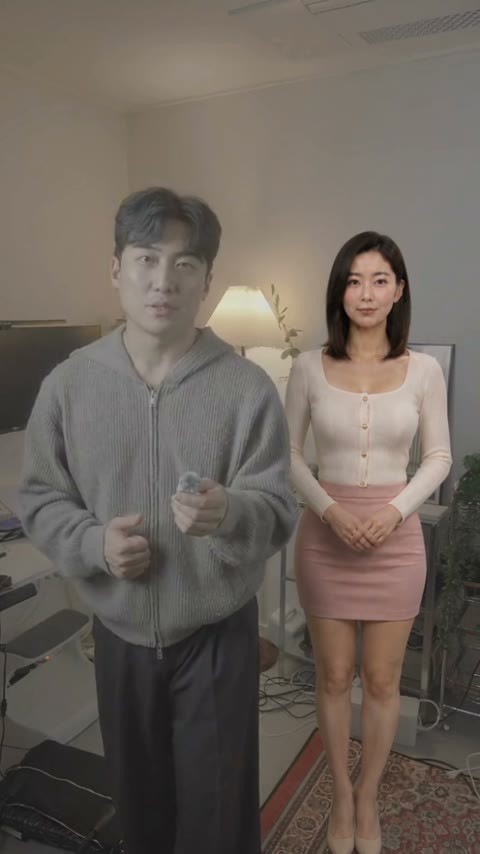
회색 집업을 정장으로
정장 참고 이미지를 추가하고 얼굴, 손, 마이크, 카메라 구도와 배경을 유지해 달라고 써요.
Change ONLY the speaking man's clothing in the supplied source video to the charcoal navy suit and plain white crew-neck shirt from the garment reference. Remove the gray zipped knit cardigan and replace his trousers with the matching suit trousers. Keep the actor himself, not the mannequin: preserve his original head, facial identity, hair, skin, neck, eyes, lip shapes, speech timing, body proportions, exact hands, fingers, gestures and standing position. Match the jacket silhouette to his body and arm movement, create believable fabric folds around the moving wrists and elbows, retain natural hand-in-front-of-clothing occlusion and the same microphone grip. Keep the original handheld furry microphone, separate tripod, room, framed poster, lamp, background, framing, camera and original timing unchanged. Match the original warm indoor lighting and low contrast. Do not beautify or regenerate the face. No scene change, morphing, transition, Matrix effects, particles, lettering, logos, captions or camera movement. The suit is already present in every frame. This is a wardrobe-only comparison test.4. 대사에 맞춰 같은 시간의 화면으로 컷해요
- 원본 음성을 타임라인 아래에 한 줄로 깔아요. AI 교체 컷은 음성을 끄고 원본 위에 올려요.
- ‘마이크’에서는 대본 카드가 있는 버전에서 마이크가 있는 버전으로, ‘삼각대’에서는 아나운서 버전에서 삼각대가 있는 버전으로 바로 잘라요. 컷 앞뒤의 얼굴 위치와 손의 높이를 같은 원본 시간에 맞춰요.
- 스튜디오와 한강까지 이어갈 때는 같은 원본·구도의 배경 교체 버전을 각각 준비해요. 배경은 광고 스튜디오 → 한강 → 실제 방 순서로 보여 줘요.
배경 교체에 써볼 예시
아래 프롬프트를 복사해 영상의 배경을 스튜디오로 바꿔 보세요.
첨부한 영상에서 인물 뒤의 방만 방송국 광고 촬영 스튜디오로 바꿔 줘. 뒤쪽 왼편에 방송용 카메라와 프롬프터, 위에는 부드러운 소프트박스 조명이 보이게 해 줘. 인물의 얼굴, 머리, 손동작, 입 모양, 옷, 마이크, 오른쪽 삼각대, 카메라 구도는 그대로 유지해 줘. 조명은 원본 얼굴의 따뜻한 빛에 맞춰 줘. 방송사 로고나 읽을 수 있는 글자는 넣지 말아 줘.AI LAB COMMUNITY
따라 하다 막히는 곳 있으면,
혼자 붙잡고 있지 마세요 🙌
같은 자료 보고 실습하는 분들이 모여 있는 카톡방이에요. 어디서 막혔는지 캡처 한 장만 올려도 같이 풀어드려요.
💬 AI 연구소 커뮤니티 입장하기 (새 창)입장 코드 1004
MORE RESOURCES
이어서 보면 좋은 자료
FIRST STEP
처음이라면, 이 순서로 해보세요.
WEEKLY NEWSLETTER
위클리 뉴스레터,
이메일로 받아보세요.
매주 정리한 AI 트렌드와 실습 자료,
무료특강 일정 안내를 이메일로 보내드려요.
AI 최신 소식은 카카오톡 채널 (새 창)에서 받아요